Vacancy Details
The Vacancy Details Web Component shows a single vacancy in detail.
Usage
<mk-vacancy-details
    id="your-vacancy-id"
    customer-id="your-customer-id"
    language="en-US"
></mk-vacancy-details>
HTML Attributes
Parameters marked with * are required.
Some attributes use the Site Parameters (Documentation, MindKey) as their default. The Site Parameters can be set by an HR person and helps them to customize the look of the Vacancy Details Web Component without a developer assistance.
You only need to set any attribute with a Site Parameter default if you want to overwrite it. This is most likely for some special recruiting pages that should look different than any other page.
| Parameter | Default | Description |
|---|---|---|
customer-id* | Your MindKey assigned customer id (GUID). | |
id* | The id of your vacancy. | |
language* | The language to request. | |
culture | The culture to use. See Language & Culture for more information | |
form-href-prefix | '' | The prefix added to links for the Application Form page. |
link-target | null | The target for all links (e.g., "_blank"). If set to null or undefined, no target attribute will be applied. |
show-start-date | By Site Parameters | Possible values: "Show", "Hide", "Sidebar". |
show-end-date | By Site Parameters | Possible values: "Show", "Hide", "Sidebar". |
show-vacancy-type | By Site Parameters | Possible values: "Show", "Hide", "Sidebar". |
show-contact-person-name | By Site Parameters | Possible values: "Show", "Hide", "Sidebar". |
show-contact-person-work-phone | By Site Parameters | Possible values: "Show", "Hide", "Sidebar". |
show-contact-person-mobile-phone | By Site Parameters | Possible values: "Show", "Hide", "Sidebar". |
show-contact-person-email | By Site Parameters | Possible values: "Show", "Hide", "Sidebar". |
show-position-start-date | By Site Parameters | Possible values: "Show", "Hide", "Sidebar". |
show-employment-category-name | By Site Parameters | Possible values: "Show", "Hide", "Sidebar". |
show-organization-name | By Site Parameters | Possible values: "Show", "Hide", "Sidebar". |
show-locations | By Site Parameters | Possible values: "Show", "Hide", "Sidebar". |
show-regions | By Site Parameters | Possible values: "Show", "Hide", "Sidebar". |
show-teaser | By Site Parameters | Possible values: "Show", "Hide", "Sidebar". |
show-company-name | By Site Parameters | Possible values: "Show", "Hide", "Sidebar". |
show-company-address | By Site Parameters | Possible values: "Show", "Hide", "Sidebar". |
show-long-date | By Site Parameters | If true will show the long date format. If false shows the short date format. Formats are documented here. |
query-param | '' | Specifies a parameter in the URL's query to read the id from. See Query Params |
append-to-title | false | If true will append the vacancy name to the HTML title attribute. Improvement for SEO and readability of browser tabs. It will concatenate the original title with the title-separator attribute and the title of the vacancy. |
title-separator | @ | The separator to use when append-to-title is true. Will result in: <Vacancy Title> <title-separator> <Original Title> |
show-image | false | true to show the vacancy banner image. |
vacancy-list-url | null | Set this to an URL that contains the Vacancy List which will be shown in case a vacancy has not been found. See Unavailable vacancies for more information. |
unsolicited-application-url | null | Set this to an URL that shows the user how to send an unsolicited application e.g. you can link to another Vacancy Details or directly to an Application Form. It will be shown in case a vacancy has not been found. See Unavailable vacancies for more information. |
automatic-social-media-content | false | true to set some social media related meta tags. Only useful for crawlers that execute JavaScript, like Google and Bing. |
show-social-share | false | true to enable the social share feature. Please also set at least one of the following share-* attributes to true to enable sharing to a specific platform. |
share-via-email | false | true to enable sharing via email. |
share-via-linked-in | false | true to enable sharing via LinkedIn. |
share-via-facebook | false | true to enable sharing via Facebook. |
share-via-whats-app | false | true to enable sharing via WhatsApp. |
Query Params
The Vacancy Details Web Component can also read the id from an URL's query parameter. This is helpful if you want to show the vacancy on a certain page and use a parameter to define which vacancy to show.
Unavailable vacancies
If you post your vacancies to social media or other platforms, a potential candidate may encounter a vacancy that is not available anymore. For example, this may happen after a vacancy has been closed or deleted.
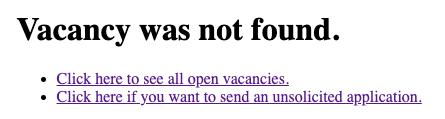
In this case the potential candidate will simply see a "Vacancy has not been found." message.
To allow the potential candidate to engage with other open positions you can set two different attributes:
vacancy-list-url: This should be set to a page that contains the Vacancy List Web Component to present the user a list with open positions.unsolicited-application-url: This should either be set to a page containing the Vacancy Details or Application Form Web Component to allow the potential candidate to send an unsolicited application.
You can either set one or both parameters. Don't forget to style it!
Per default it will render a simple user interface:
Example
If you use the vacancy component on a certain web page, for example https://your-company.com/vacancy and you setup the Vacancy Details Web Component like this:
<mk-vacancy-details
    id="your-vacancy-id"
    query-param="vacancyId"
    customer-id="your-customer-id"
    language="en-US"
></mk-vacancy-details>
Then you can link to the page with https://your-company.com/vacancy?vacancyId=example-id to show a vacancy with id example-id.
If you're using the Vacancy List Web Component, you can define a details-href-prefix.
This allows the list to create links to the details page.
For above's example, the implementation would be:
<mk-vacancy-list
    details-href-prefix="vacancy?vacancyId="
    customer-id="your-customer-id"
></mk-vacancy-list>
Setting details-href-prefix to vacancy?vacancyId= will make the component generate a link like https://your-company.com/vacancy?vacancyId=example-id.
Configurator
Basic
Display
Social Sharing
Stylesheets
- Preview
- Code
customer-id and select a language to see a live preview.<mk-vacancy-details></mk-vacancy-details>
<!DOCTYPE html>
<html lang="en">
<head>
    <meta charset="UTF-8" />
    <meta name="viewport" content="width=device-width, initial-scale=1.0" />
    <title>MindKey Recruiting</title>
    <script src="https://recruiting.mindkey.com/mk-recruiting-components.js"></script>

</head>
<body>
    <mk-vacancy-details></mk-vacancy-details>
</body>
</html>